Make your own Battle mode sound pack: the 5-minute guide
The best battle is the one where the sounds come from your own crew: your Discord server's meme, your cat's yowl, the office microwave. On TryToAct, any player can make a sound pack for Battle mode and publish it in the library. It takes five minutes.
In short
To make a Battle sound pack on TryToAct: open "Create a pack", pick "Battle pack", import 5 to 15 audio or video files (MP3, MP4, WAV…), cut a 0.8 to 3 second moment from each one, give the pack a name and a category, then publish. The pack goes straight into the Battle mode library, credited to your username. It's free.
- The rules of a Battle pack
The limits set by the studio.
- Sounds per pack
- 5 to 15
- Length of a sound
- 0.8 to 3 s
- Formats
- Audio and video
- Price
- Free
What you need
• Between 5 and 15 sounds. With fewer than five, a game repeats itself. Past fifteen, the pack gets heavy to load on a phone for the whole room.
• Sounds or videos: the studio takes audio and video files, and pulls the sound out of a video on its own.
• A TryToAct account (free, with Google, Discord or Twitch).
Step 1: open the studio and import your files
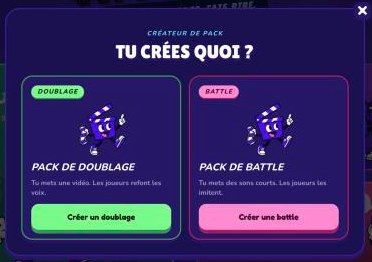
From the home page, click Create a pack, then Battle pack. The same button also lets you create a dubbing pack, if you'd rather have players redo the voices of a scene.
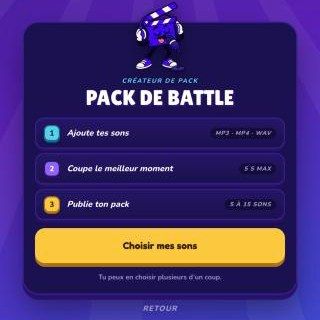
Add all your files at once: they are queued up and you work through them one by one. Your draft is saved, so you can come back and finish it later.
Step 2: cut up to 3 seconds from each sound
For each file, you choose the moment to keep: 3 seconds at most, and at least 0.8 seconds. The studio suggests the loudest moment and you fine-tune the window by ear.
Why 3 seconds? Each sound is played, imitated, then replayed once per player. In a room of twelve, a 3-second sound already makes a round of about two minutes. Any longer and the game drags.
Give each sound a name: that's what shows up during the round.
Step 3: pick good sounds
The sounds that work best in a battle:
• Have a recognizable shape: a start, a rise, an end. An "aaa-OOO", a horn that chokes, a line with a strong intonation. That's exactly what our judges look at.
• Can be done with a human mouth. A whole song or a crowd's hubbub just gets frustrating.
• Are funny when you miss them. That's the whole point.
Avoid: 3-second sounds with 2 seconds of silence, copyrighted music, and anything aimed at mocking a real person. The full rules are in our moderation charter and our copyright page.
Step 4: name and publish your pack
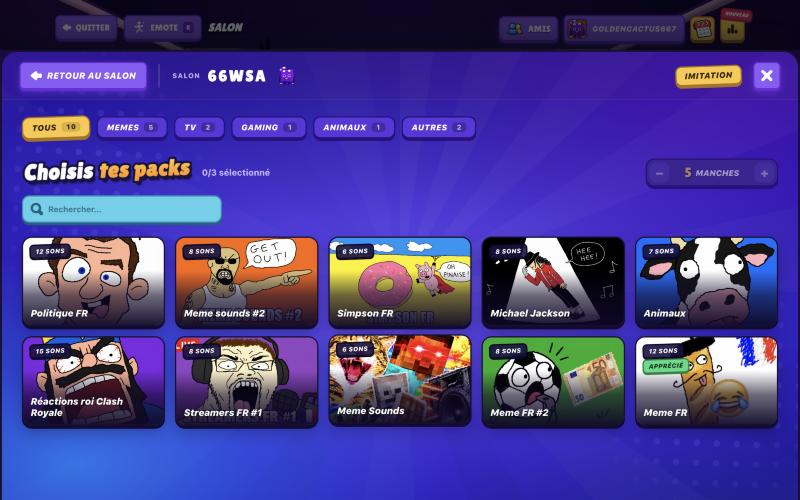
Give the pack a title, choose its category (Memes, Movies, TV, Gaming, Animals or Other) and publish. Your pack goes straight into the library, credited to your username, and the studio offers to start a battle right away so you can test it.
What happens next
You can follow your pack in the My packs tab: how many games were started with it, thumbs up and thumbs down at the end of each game. Only you can see these numbers. Packs that players love get the Liked badge. A pack that gets heavily downvoted or reported is removed from the library.
Pack ideas that work
• Your server's memes: the sounds everyone in your group knows by heart.
• Everyday noises: the microwave, a creaky door, a phone notification.
• Animals: the unbeatable classic, from the goat to the dolphin.
• Video games: coin sounds, jumps, power-ups, character shouts.
• Famous movie lines: 2 to 3 seconds of a line with a strong intonation. For ideas, we listed 15 iconic scenes (in French).
Frequently asked questions
How many sounds do I need to publish a Battle pack?
Between 5 and 15 sounds, each 0.8 to 3 seconds long.
Which file formats are accepted?
The studio takes common audio and video files, such as MP3, WAV or MP4. For a video, it pulls out the sound.
Can I use a TikTok or YouTube video?
You can import any video or audio file stored on your device. Make sure you have the right to use it.
Is my pack visible right away?
Yes, it is published straight into the library. It can be removed if players heavily downvote or report it.