Games to play on a Discord call: 7 free ideas where your mic matters
There are six of you in a Discord voice channel, it's 10 p.m., and someone asks "so what are we playing?" The right answer fits in a link: a game that opens in the browser, with nobody having to buy or install anything. Here are seven free games that work really well on a call, including several where you play with your voice.
The short answer
The best free games to play on a Discord call launch from a link in the browser: TryToAct's Battle mode (imitate sounds into your mic, up to 12 players), TryToAct's multiplayer dubbing (dub movie scenes), Gartic Phone (the Telephone game with drawings), skribbl.io (Pictionary), BombParty on JKLM.fun (find words under pressure) and Codenames online. Jackbox works too, but one player has to buy it and share their screen.
What makes a good Discord game
• It launches from a link: the host pastes the address in the channel, everyone clicks.
• It's free for everyone, not just the host.
• It works with a crowd: a server isn't a duo.
• It creates moments to talk about on the call. That's where voice games shine: everyone hears everyone else mess up.
1. TryToAct, Battle mode: imitate sounds into your mic
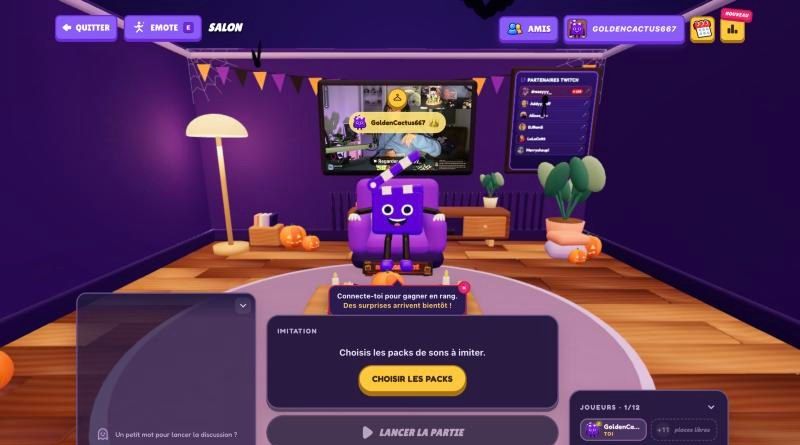
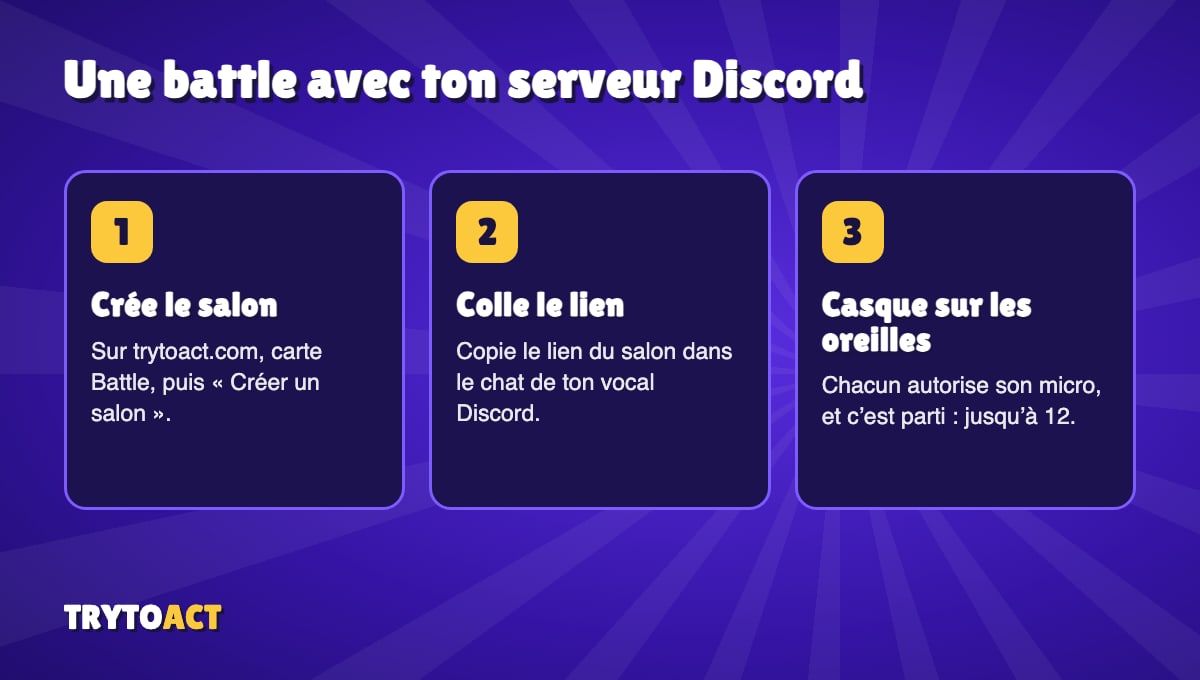
A meme sound plays, everyone gets one take to imitate it, and four judges score out of 10 in a 3D theater. It's perfect for Discord, since the embarrassment is shared live. Free, for up to 12 players per room, and you can make a pack with your server's memes.
2. TryToAct, dubbing mode: act out a movie scene
Same site, different vibe: you dub a movie or TV scene together. In co-op, up to four players split the roles. In VS mode, up to twelve compare their takes on the same scene. A great way to end the night with some iconic scenes.
3. Gartic Phone: the Telephone game with drawings
Everyone writes a sentence, the next player draws it, the next one guesses the drawing, and so on. Free in the browser, and built for big groups. Best part: the final reveal, to laugh about on the call.
4. skribbl.io: Pictionary online
One player draws, the others guess in the chat. Free, no account, with private rooms. Best part: you can add your own words, like your server's inside jokes.
5. BombParty (JKLM.fun): words under pressure
A bomb is passed from player to player: you have to type a word containing the given letters before it explodes. Free, no account required, and playable in English and several other languages. Best part: it takes ten seconds to explain.
6. Codenames online: the team game
Two teams, one-word clues to get your teammates to guess several cards. The official online version is free to play in the browser. Best part: voice chat is essential for the debates.
7. Jackbox: the classic, but paid
Jackbox Party Packs are still the benchmark. Only one player needs to own the game (how it works, officially) and share their screen on Discord; the others join at jackbox.tv with a code. A pack costs around $30, and screen sharing adds lag. For free options, see our list of Jackbox alternatives.
Discord settings for voice games
For games where you record your voice (Battle, dubbing), a few settings save you from nasty surprises:
• Wear headphones. Otherwise the game's sound and your friends' voices leak back into your mic, and your take gets muddy.
• Let the game use your mic at the same time as Discord. Your browser will ask for permission the first time.
• Mute yourself on Discord during your take if someone is talking loudly in your headphones: the echo won't get into your mic.
• Turn off overly aggressive noise suppression if your imitation sounds muffled: it can cut out sounds that don't sound like a voice.
Frequently asked questions
What free game can I play with friends on a Discord call?
Browser games like TryToAct's Battle mode, Gartic Phone, skribbl.io or BombParty launch from a link shared in the channel, with nobody having to buy or install anything.
What game can you play on Discord with your mic?
TryToAct's Battle mode is played with your voice: everyone imitates the same sound into their mic and four judges score each take out of 10. The dubbing mode also lets you act out movie scenes together.
How many players can join a TryToAct battle?
Up to 12 players per room.
Do I need to share my screen on Discord?
Not for browser games: everyone opens the link on their own device. Screen sharing is only needed for Jackbox.