A free Dub Together alternative you can play in your browser
Dub Together was one of the nice surprises on Steam this fall: you dub a clip into your mic with your friends, then vote for the best version. But it needs a Windows PC, and every player has to buy their own copy. If some of your group are on a Mac or a phone, or just don't want to pay, TryToAct gives you the same kind of fun for free, right in the browser.
The short answer
To dub scenes with friends without buying Dub Together, TryToAct is free and runs in the browser (PC, Mac, phone), in co-op for up to 4 players or in VS for up to 12. Like Dub Together, it has voice filters, lets you build packs from your own videos and download your dub. On top of that, every dub gets an accuracy score. TryToAct is not affiliated with Dub Together or its studio.
Dub Together in a nutshell
Dub Together is a dubbing game made by Banani, released on Steam on September 1, 2026 for $4.99 (Steam page). Up to eight players online either dub the same clip (Parallel) or split the roles between them (Character). It comes with six voice effects, a pack creator, Steam Workshop support, video export and Twitch chat voting. Players rate it highly (93% positive reviews), and it deserves it.
Where it falls short for a last-minute game night:
• Windows only: no Mac, no phone.
• Every player has to buy it on Steam.
• No objective score: the vote decides.
How TryToAct recreates the experience
- Everyone dubs the same clip
In Dub Together: Parallel mode.
- On TryToAct
- VS mode
- Players
- Up to 12
- Everyone takes a role
In Dub Together: Character mode.
- On TryToAct
- Co-op mode
- Players
- Up to 4
- Voice effects
Dub Together has six.
- On TryToAct
- 12 filters
- Examples
- Deep, Chipmunk, Robot, Underwater
- Make your own packs
Dub Together: pack creator and Workshop.
- On TryToAct
- Pack studio
- Sharing
- Community library
- Keep the video
Dub Together: video export.
- On TryToAct
- Download button
- Sharing
- Post to the feed
What TryToAct adds
• An accuracy score: every take is compared with the original actor's performance (rhythm, volume, intonation), without judging the sound of your voice. To get better, read our guide on syncing your voice to the picture.
• Solo mode: you can practice on your own before taking on your friends.
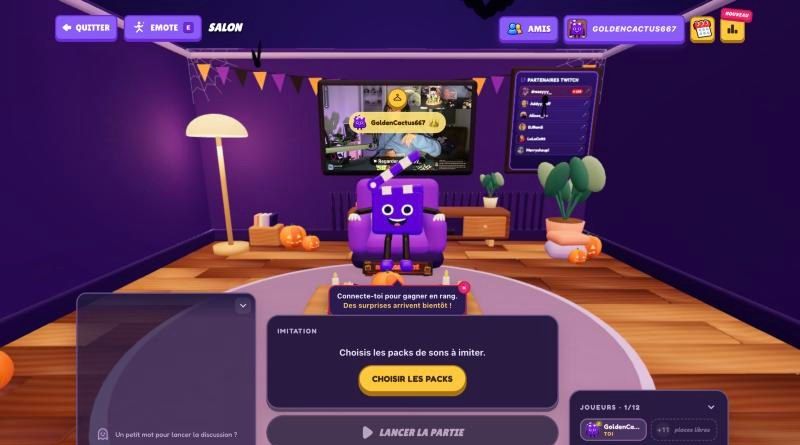
• A 3D lobby where players meet up before the game.
• Battle mode: between two scenes, you can mimic sounds into your mic, in the spirit of Mimic Party.
• It's all free, and it runs on any device with a recent browser and a mic.
What Dub Together does better
To be fair: the automatic speech detection in its pack creator is really handy, Twitch chat voting is built in, and the Steam Workshop gives it a huge catalog. Our scene library also still leans toward French-language content, while English packs are growing. If your whole group already owns the game, stick with it. TryToAct is for when someone doesn't have Windows or Steam, or when there are more than eight of you.
Start a game in 1 minute
• Go to trytoact.com and pick Play multiplayer.
• Sign in (Google, Discord or Twitch) and create a room.
• Send the link or the code to your friends.
• Pick co-op or VS, choose a scene, and you're off.
For a proper night of it, follow our guide to hosting a dubbing night.
Frequently asked questions
Is there a free version of Dub Together?
No, Dub Together is a paid game on Steam ($4.99). To dub scenes with friends for free, TryToAct has a multiplayer mode that runs in the browser, with nothing to buy.
Can you play Dub Together on a Mac or a phone?
Its Steam page only lists Windows. TryToAct runs in the browser, so it works on Mac, PC, Android and iPhone.
How many players can dub together on TryToAct?
Up to 4 in co-op (one role each) and up to 12 in VS mode (everyone dubs the same scene).
Does TryToAct have voice effects like Dub Together?
Yes, 12 voice filters: Deep, Chipmunk, Monster, Robot, Alien, Phone, Megaphone, Echo, Cathedral, Cave, Choir and Underwater.